Jupyter Notebooks :notebook: by Naereen @ GitHub
This repository hosts a lot of Jupyter Notebooks, covering various subjects. Everything is open-sourced under the MIT License, you can use any of these notebooks for your own teaching activities if you want. Please open an issue, or ask me anything or drop an email if you have any questions, suggestions, or more.
Which languages? Half of the notebooks here are in :gb: English, and the other half in :fr: French (surtout pour l’agrégation de mathématiques option informatique, dans ce dossier agreg/), and most use the Python language, or OCaml, and a few notebooks use other languages like Julia, Rust, Java or even Bash, C and Octave!
How to read or use these notebooks?
You can view this repository on nbviewer to read notebooks statically, or read them directly from GitHub.
You can also launch an interactive environment to play with the code by yourself, using one of these platforms:
- MyBinder should work fine even for OCaml notebooks, but it’s quite slow. It’s fully open-source, and reliable:

-
Google Colab should work only for Python notebooks, but it’s blazing fast to load. It’s not open-source and requires to use Google’s servers:

- New! In Feb’21, I have installed the amazing Basthon notebook to my website, at http://notebook.besson.link/, and you can use it with any of the notebooks available in the repository, for instance https://besson.link/Basthon/notebook/?from=../../publis/notebooks/Py_Pi_Day_2017.ipynb for
Py_Pi_Day_2017.ipynb, because this folder is synced on my website at https://besson.link/publis/notebooks/. Please open an issue if this doesn’t work!
My use of notebooks - short story since 2015
- At the beginning (as early as end of 2015!), this repository was only here to host some small experiments, for me to learn how to use the wonderful Jupyter tools correctly. So they were baby notebooks :baby_bottle:… Since then, I did a lot of experiments, on all the most important kernels (Python, Julia, but also less standard ones like OCaml, Rust, Java, C, Bash, etc), all the most exciting notebook extensions, and output formats (PDF, script, static HTML, slides, etc). I’ve kept learning and discovering more awesomeness of the Jupyter environment, and it never stops to amaze me :sparkles:!
- In the last 5 years (2016-2021), I’ve used Jupyter notebooks intensively, to teach algorithmics, programming, and (not so theoretical) computer science in general, mainly in :fr: French. I wrote notebooks to teach introduction to Java in 2020, advanced algorithms using Python in 2019, and a lot for experimenting during my PhD thesis.
- :fr: J’ai aussi corrigé tous les textes d’annales de modélisation, en option informatique, pour le concours national de l’agrégation de maths, en utilisant OCaml ou des fois Python ! Ce sont les seuls corrigés de ce type disponibles sur tous les Internets (j’ai cherché partout !), et ils sont dans ce dossier :
agreg/. Je compte déplacer ça dans un dossier à part, et bien les nettoyer et mettre à jour, en 2021. -
I love the Jupyter environment, from the old IPython command line to the recent awesome Jupyter Lab. If you want to discover amazing things, check out: RISE for live slides in a notebook, lolviz and rcviz and tutormagic for nice data structures visualizations in a notebook.
- In the future, I plan to mostly teach using Jupyter notebooks, using either the regular Python kernel, the OCaml-jupyter kernel for OCaml (and also IJava for Java, this one for C, and more if needed). RISE slides embed a chalk-board mode, more limited in comparison to the amazing TableauNoir.
A partial list of notebooks in this repository
I’m trying to maintain here a list of the notebooks stored in this repository, inspired by the amazing pytudes by Peter Norvig. The links open nbviewer), and the links (on GitHub?) open the notebook to be viewed directly in GitHub (it should work for almost all of them).
:shell: Bash
- The first notebooks I wrote are small tutorials for :shell:
bashcommands (or some of my command-line scripts), see for example a tutorial on head and a tail (on GitHub?).
:snake: Python
I am a passionate user of the Python programming language.
Science
-
This notebook written for the Pi Day 2017 (on GitHub?) demonstrates a dozen of easy algorithms to compute from 10 to 100000 digits of the number pi.
-
This notebook implements a simple example of the simulated annealing algorithm (on GitHub?) to minimize black-box functions :sunglasses:.
-
This notebook shows a hand-written and clear implementation (on GitHub?) of several Hashing functions, like
MD5,SHA1, and all variants ofSHA2(SHA256,SHA224,SHA512,SHA384). -
This notebook shows a manual implementation (on GitHub?) of the Lempel-Ziv complexity in pure Python, and then as optimized Python code, with Cython or Numba. I also wrote a version in Julia (in the same notebook), and compare the 4 implementations! I then published my code as a Pypy package, see here on pypi.org.
-
This notebook shows a hand-written and clear implementation (on GitHub?) of several Pseudo-Random Number Generators, including the famous Mersenne twister algorithm, and then uses it to samples from the most famous discrete and continuous distributions, showcasing use of the Inverse-Transform method and Acceptance-Rejection method (cf. Markov Chain Monte-Carlo methods).
-
This notebook implements and compares different Runge-Kutta methods (on GitHub?) for integrating Ordinary Differential Equations in Python. And also in Julia (on GitHub?), and also in OCaml (on GitHub?). I wanted to compare the three languages for the same algorithms. Well, obviously, Julia is the fastest and simplest for numerical simulations like this.
-
:fr: Ce petit notebook en français (sur GitHub ?) implémente les algorithmes de vérifications des numéros de cartes bleues, de sécurité sociale et d’IBAN en Python.
-
This notebook implements and explore the Exponential Integral function Ei(x) (on GitHub?).
-
This notebook shows how to solve the equation
exp(- a x²)=xboth numerically and formally (with the Lambert W function) (on GitHub?). -
This notebook implements Kullback-Leibler divergences for some parametric distributions, and KL-UCB indexes, in naive Python and compare with optimized versions using JIT compilation by Numba or C compilation by Cython (on GitHub?).
-
This short notebook defines and studies the Rényi entropy (on GitHub?).
-
:fr: Ce notebook présente des approches simples pour générer un dictionnaire des mots français adaptés à l’écriture inclusive, comme beau/belle -> beau·elle, professeur/professeure -> professeur·e, il/elle -> iel/ielle etc (on GitHub?). Ici ce trouve le dictionnaire généré (contenant environ 26 000 mots différents).
Work in progress?(je ne terminerai pas, c’est trop compliqué de faire ça parfaitement) -
:fr: En s’inspirant de cet article (décembre 2020), j’expérimente dans ce notebook avec scikit-learn pour détecter les similarités et les risques de plagiat dans des projets étudiants écrits en Java (mais l’approche est indépendante du langage !) (on GitHub?)
-
This long but easy to follow notebook explains how to solve the regular expression cross-words from this website, as I was struggling to solve this difficult one (Volapük Lul) (on GitHub?)
Teaching
-
:fr: Ce notebook en français présente les problèmes de bandits multi-bras stochastiques (on GitHub?) (multi-armed bandit, MAB), et les algorithmes dits “de bandits” pour les résoudre (UCB “Upper Confidence Bounds”, KL-UCB, Thompson Sampling, Approximated Finite-Horizon Gittins index etc). C’est une bonne introduction aux outils que j’utilise pour ma thèse.
-
:fr: I corrected some maths & programming problems from the annals of the CentraleSupelec national competitive exam (in France), in this notebook Oraux_CentraleSupelec_PSI__Juin_2017.ipynb (on GitHub?) (for this kind of oral exam). Again in 2018, Oraux_CentraleSupelec_PSI__Juin_2018.ipynb (on GitHub?).
-
:fr: Ce notebook en français est un petit tutoriel pour apprendre à résoudre des problèmes/programmes linéaires en Python avec SciPy, pour le cours ALGO2 à l’ENS Rennes en janvier 2021 (on GitHub?).
-
:fr: Ce notebook en français montre une expérimentation de visualisation interactive de l’algorithme du Simplexe, pour le cours ALGO2 à l’ENS Rennes en février 2021 (on GitHub?).
-
:fr: Ce petit notebook en français présente un challenge : « Comptez le nombre de mois de février répondant à ce critère (je n’ai pas trouvé de nom précis), depuis l’année de création de l’ENS Rennes (1994, enfin pour Cachan antenne Bretagne) jusqu’à 2077 (1994 et 2077 inclus). ». (on GitHub?).
-
:fr: :bug: Ce petit notebook en français montre comment déboguer du code Python depuis Jupyter (on GitHub?).
Numerical simulations for dice games (:fr: in French)
- I also wrote some notebooks on numerical simulations of dice games :fr: Voir ce sous-dossier (ou sur GitHub?) / :gb: See this sub-folder (or on GitHub?).
:art: Art
- This notebook shows some “obfuscated” code, producing (on GitHub?) :sparkles: nice figures… Or maybe they are pieces of code art :art: ?
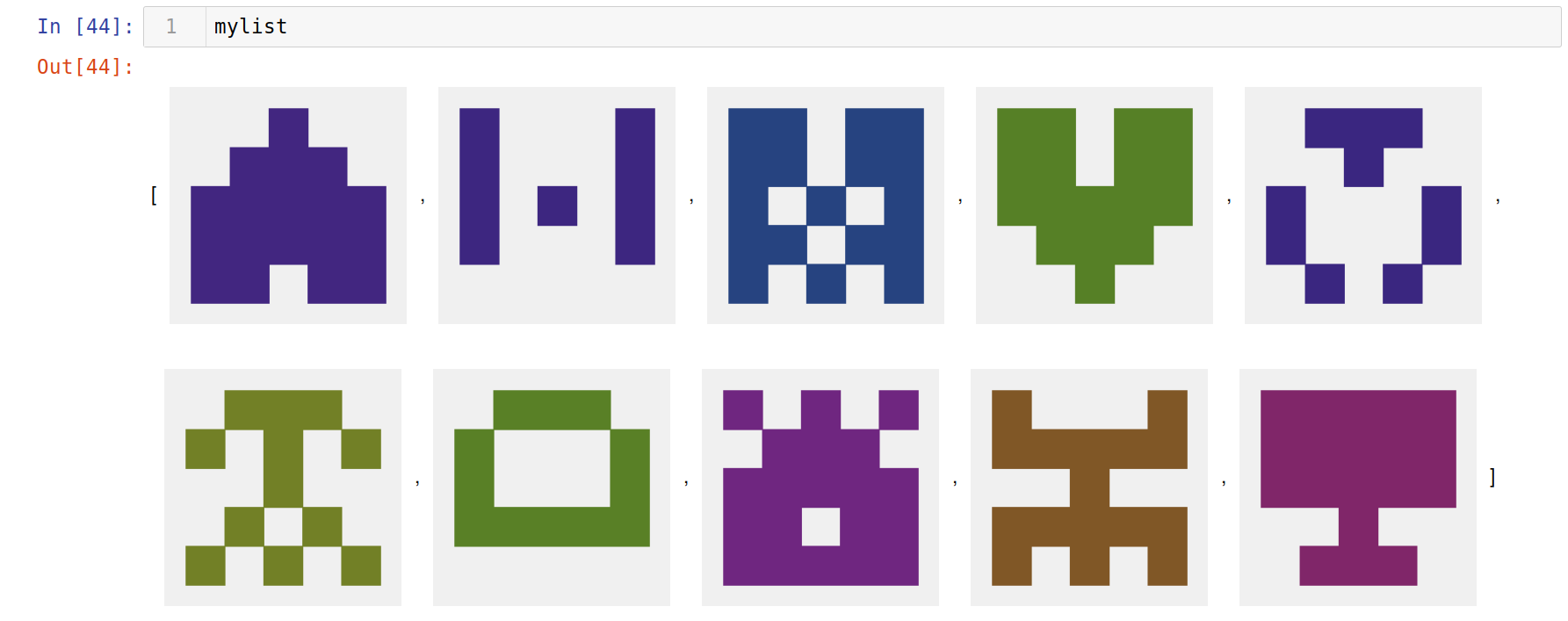
- This notebook implements in Python a generator of small “identicon” like the dislayed on GitHub for users without profile pictures (on GitHub?) :sparkles:. See this example:
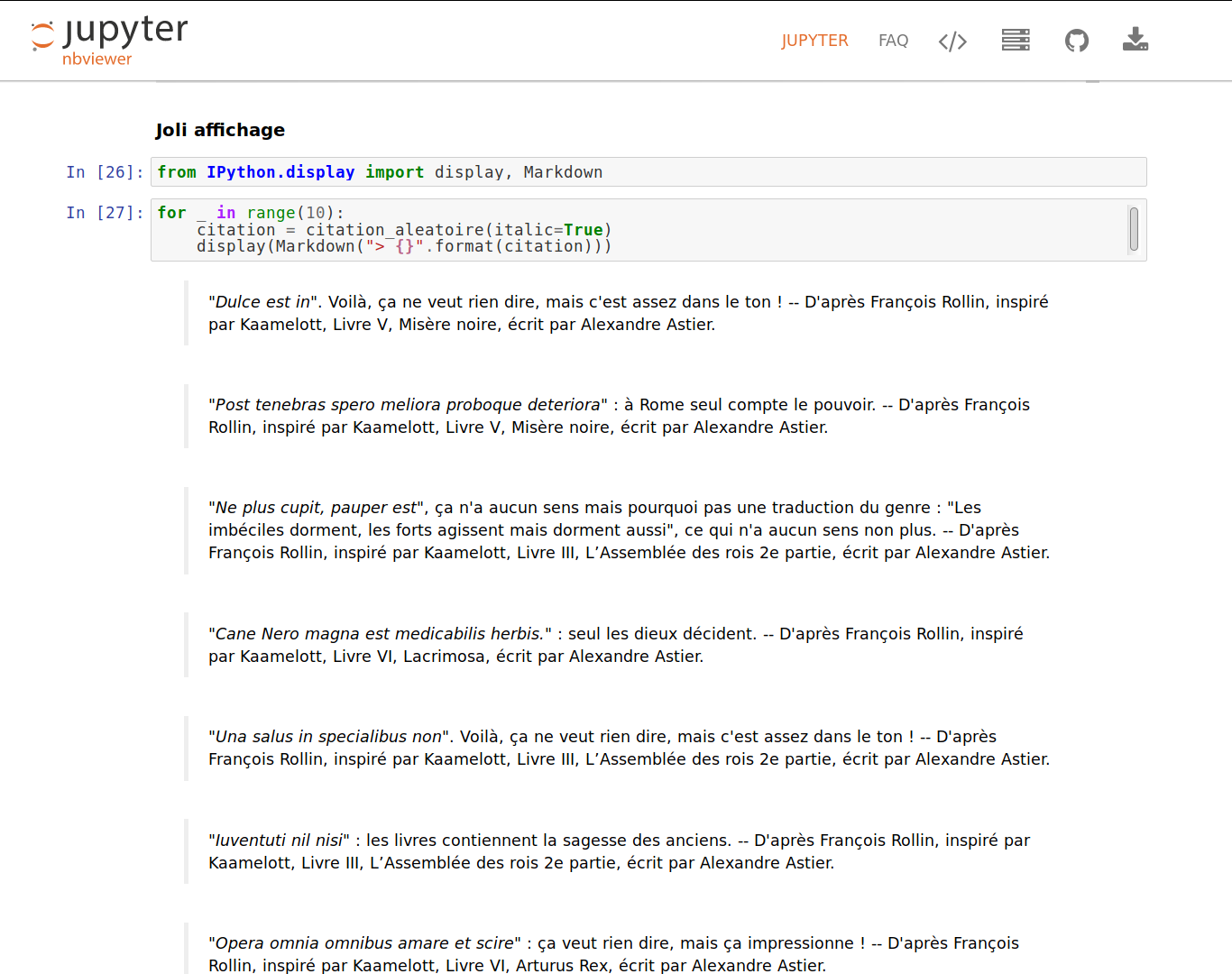
- :fr: Ce notebook montre comment générer des fausses citations latines du Roi Loth, avec une chaîne de Markov, la liste de locutions latines extraite de Wikipédia, et la liste des vraies citations latines du Roi Loth extraite de Wikiquote. Exemples :
Experiments with Python
-
This small notebook (on GitHub?) is a fun experiment, where I tried to use James Powell (@dutc) rwatch module to write a Python context manager to add a Gaussian white noise to every numbers inside the context… Something like:
with noise(): x = 10will producex = 10.325for instance… It fails, but I almost got it, and it works (without breaking the interpreter) for complex numbers. That’s already intersting! -
This notebook (on GitHub?) is a small experiment, written quickly, about floating-point error propagation when using a non-naive polynomial multiplication with evaluation-and-interpolation. Sadly, this approach fails!
-
A tiny presentation on how to do time/memory profiling (on GitHub?) from inside the Jupyter notebook interface, with various approaches.
-
🔍 ✨ I first tried the
lolvizmodule in 2017 (on GitHub?), and then again in 2021, to improve it, with a unified display function that chooses the best one based on the datatype (on GitHub?).
Experiments with Jupyter
-
This notebook shows how to register a custom HTML writer for builtins or user-defined types in IPython and Jupyter (on GitHub?), for the sake of the example I wrote a nice LaTeX/MathJax-powered print function that nicely displays polynomials from the
numpy.polynomial.Polynomialmodule or class. -
A small benchmark between Python, Pypy and Julia for the Romberg numerical integration algorithm (on GitHub?). Julia is the fastest, but Pypy is very fast too :snake: !
-
Demo of the RISE Jupyter extension to easily write a dynamic slideshow in a Jupyter notebook, for Python (on GitHub?) and for OCaml (on GitHub?) :loudspeaker:.
-
:fr: Cette comparaison des deux extensions
tutormagicetnbtutordans ce notebook (20/02/2021) (on GitHub?) -
:negative_squared_cross_mark: Demonstration of using the
nbtutorextension offline this other tiny notebook (20/02/2021) (on GitHub?) - Failure! TODO:
With the C language
- An example notebook in C language, showing two approaches to match a regular expression from a large text (on GitHub?)
With Julia
- This notebook shows a implementation of a naive algorithm to compute eigen values and eigen vectors for full rank matrices (on GitHub?, on Julia.
🐫 OCaml
- Some notebooks are written in French :fr:, mainly documents written for the preparation to the highly competitive French national exam to become a professor (aka the “agrégation”), as since 2016 I am a teaching assistant at ENS de Rennes in the Computer Science department, for the “Fundamental Computer Science” minor option (D) for the agrégation exam. :fr: Voir ce sous-dossier (ou sur GitHub) / :gb: See this sub-folder (or on GitHub).
And more will come… soon! :bullettrain_front:




1. How to read these documents?
1.a. View the notebooks statically :memo:
- Either directly in GitHub: see the list of notebooks;
- Or on nbviewer.jupiter.org: list of notebooks.
1.b. Play with the notebooks dynamically :boom:

Anyone can use the mybinder.org website (by clicking on the icon above) to run the notebook in her/his web-browser. You can then play with it as long as you like, for instance by modifying the values or experimenting with the code.
You can also launch an interactive environment to play with the code by yourself, using one of these platforms:
- MyBinder should work fine even for OCaml notebooks, but it’s quite slow. It’s fully open-source, and reliable:
-
Google Colab should work only for Python notebooks, but it’s blazing fast to load. It’s not open-source and requires to use Google’s servers:
- New! In Feb’21, I have installed the amazing Basthon notebook to my website, at http://notebook.besson.link/, and you can use it with any of the notebooks available in the repository, for instance https://besson.link/Basthon/notebook/?from=../../publis/notebooks/Py_Pi_Day_2017.ipynb for
Py_Pi_Day_2017.ipynb, because this folder is synced on my website at https://besson.link/publis/notebooks/. Please open an issue if this doesn’t work!
Note: Only the Python kernel is supported on the MyBinder interface!
2. Requirements to run the notebooks locally?
All the requirements can be installed with pip and by running a few python -m ... commands.
Note: if you use Python 3 instead of Python 2, you might have to replace
pipandpythonbypip3andpython3in the next commands (if both pip and pip3 are installed).
:warning: I’ve not updated this section since 2016.
2.a. Jupyter Notebook and IPython
sudo pip install jupyter ipython
It will also install all the dependencies, afterward you should have a jupyter-notebook command (or a jupyter command, to be ran as jupyter notebook) available in your PATH:
$ whereis jupyter-notebook
jupyter-notebook: /usr/local/bin/jupyter-notebook
$ jupyter-notebook --version  # version >= 4 is recommended
4.2.1
2.b. Other kernels (optional):
They are only needed to run the notebooks written for Bash or Octave (or OCaml):
2.b.1. GNU Bash kernel
- You have to have
bashinstalled (already there on all Linux distribution, installable withbrewormacportson Mac OS, available on Windows throughcygwin):
$ bash --version | head -n1
GNU bash, version 4.3.42(1)-release (x86_64-pc-linux-gnu)
- And then install the kernel
bash_kernelwith these two commands:
sudo pip install bash_kernel
python -m bash_kernel.install
2.b.2. GNU Octave kernel
- You have to have
octaveinstalled (installable with the package manager on major Linux distributions (apt-get,pacman,yumetc), installable withbrewormacportson Mac OS, available on Windows throughcygwinor natively):
$ octave --version | head -n1
GNU Octave, version 4.0.0
- Your version of Octave should be installed with gnuplot support (it is usually the case):
$ gnuplot --version | head -n1
gnuplot 5.0 patchlevel 1
- And then install the kernel
bash_kernelwith these two commands:
sudo pip install octave_kernel
python -m octave_kernel.install
2.b.3. OCaml kernel: OCaml-Jupyter
It is quite easy to install, with opam:
opam install jupyter
I started by using this OCaml kernel called IOCaml. The instructions were not so simple, cf. the tutorial by @andrewray on iocaml’s wiki. It was prone to some bugs, and I had to manually implement a script to be able to convert the notebooks to PDF with
jupyter-nbconvert --to pdf. Note that I also had to write a customExporterforjupyter-nbconvertin order to convert the notebooks to OCaml scripts (.ml).
:information_desk_person: More information?
- More information about notebooks (on the documentation of IPython) or on the FAQ on Jupyter’s website.
- More information about mybinder.org: on this example repository.
- :fr: Plus d’informations sur Basthon : https://basthon.fr/about.html
:scroll: License ? 
All the notebooks in this repository are published under the terms of the MIT License (file LICENSE.txt). © Lilian Besson, 2016-21.